
 网络编程
网络编程
# 网络编程
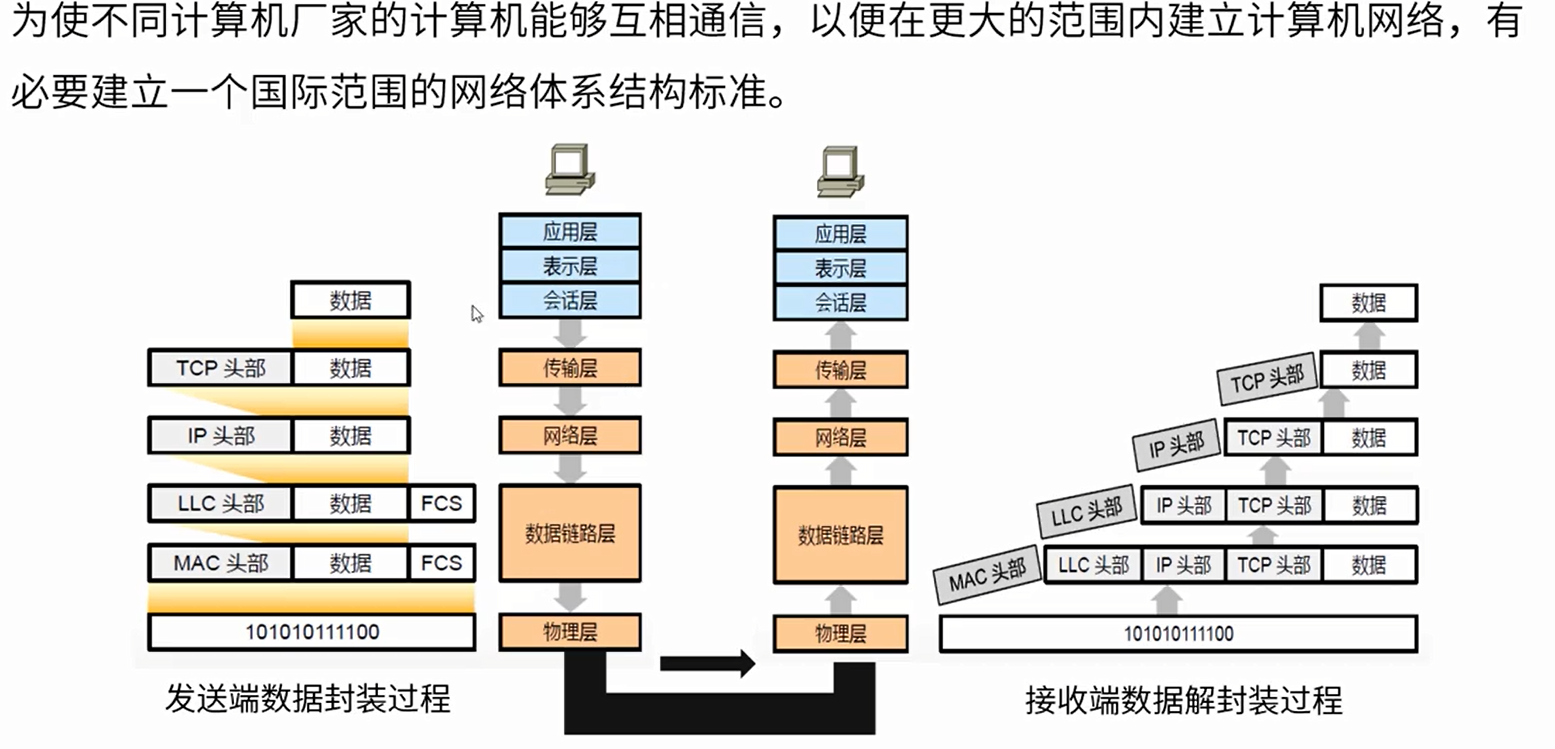
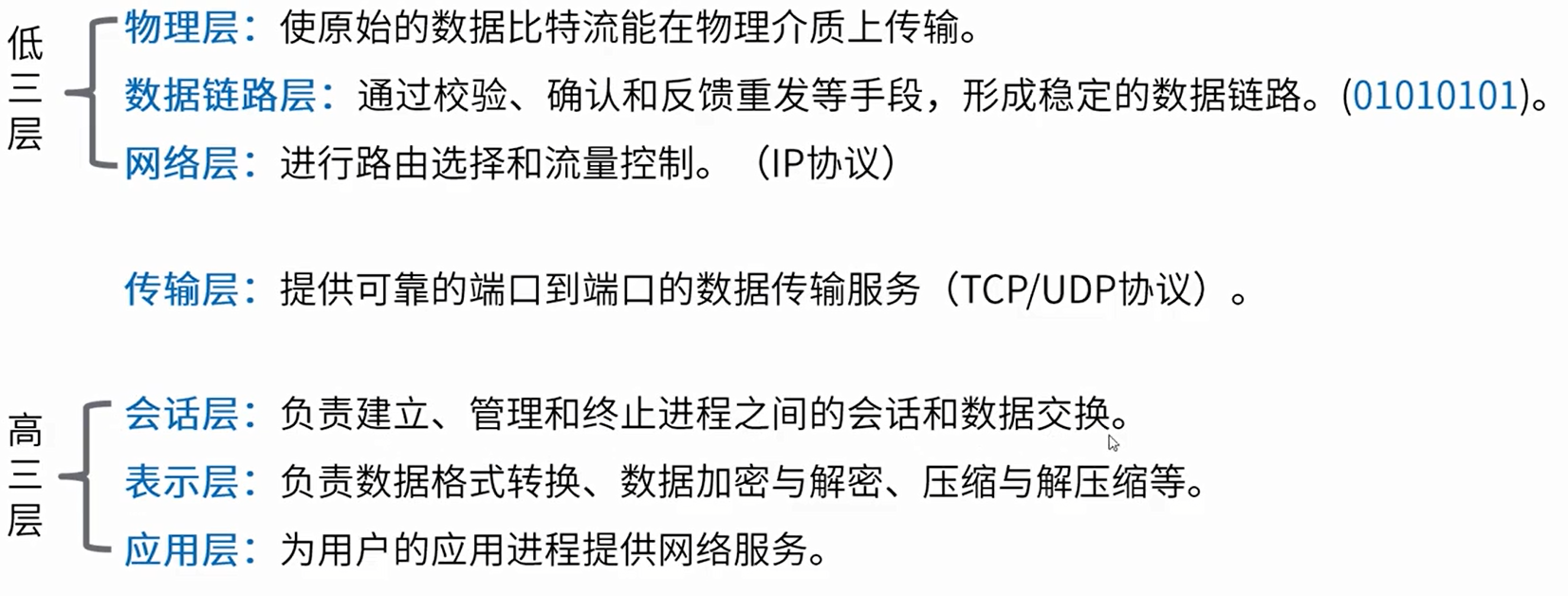
# OSI网络模型
# TCP/UDP协议
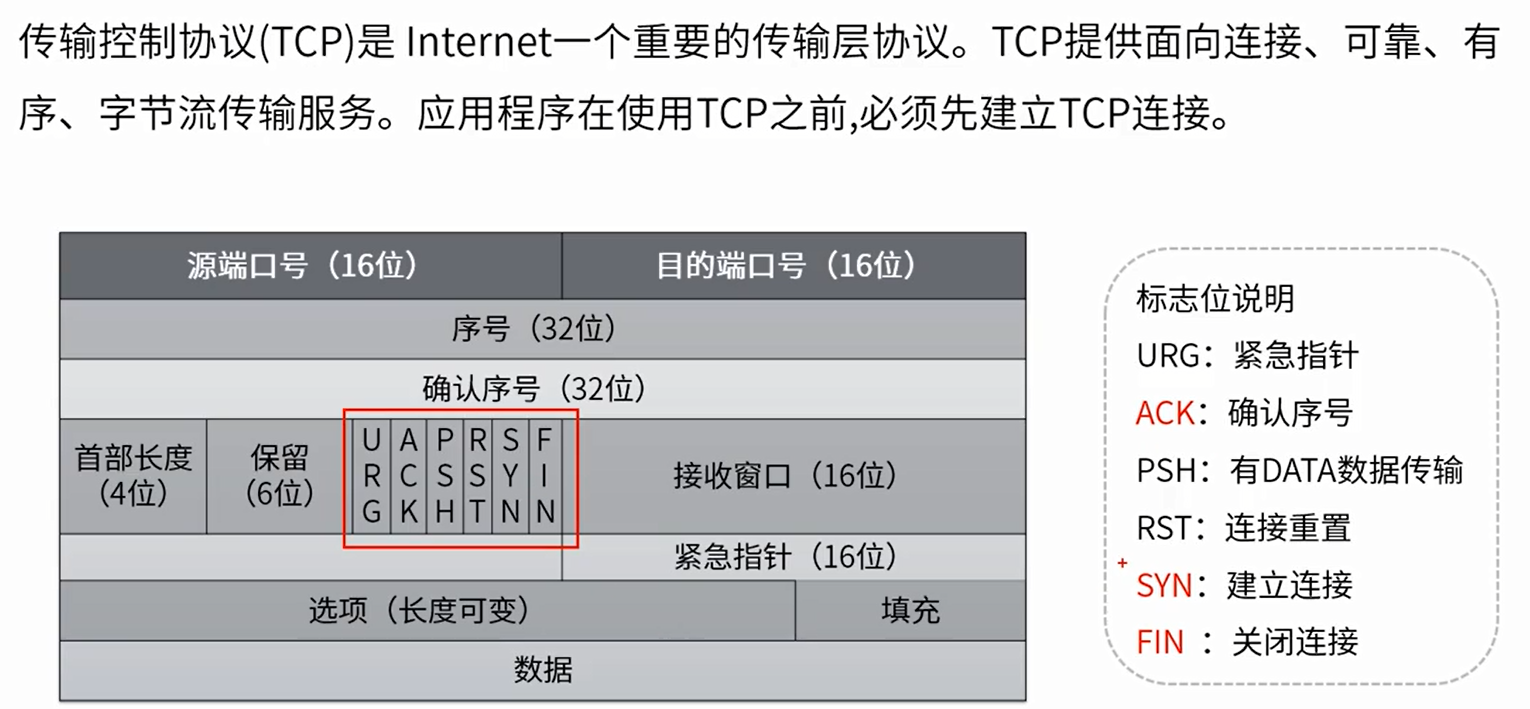
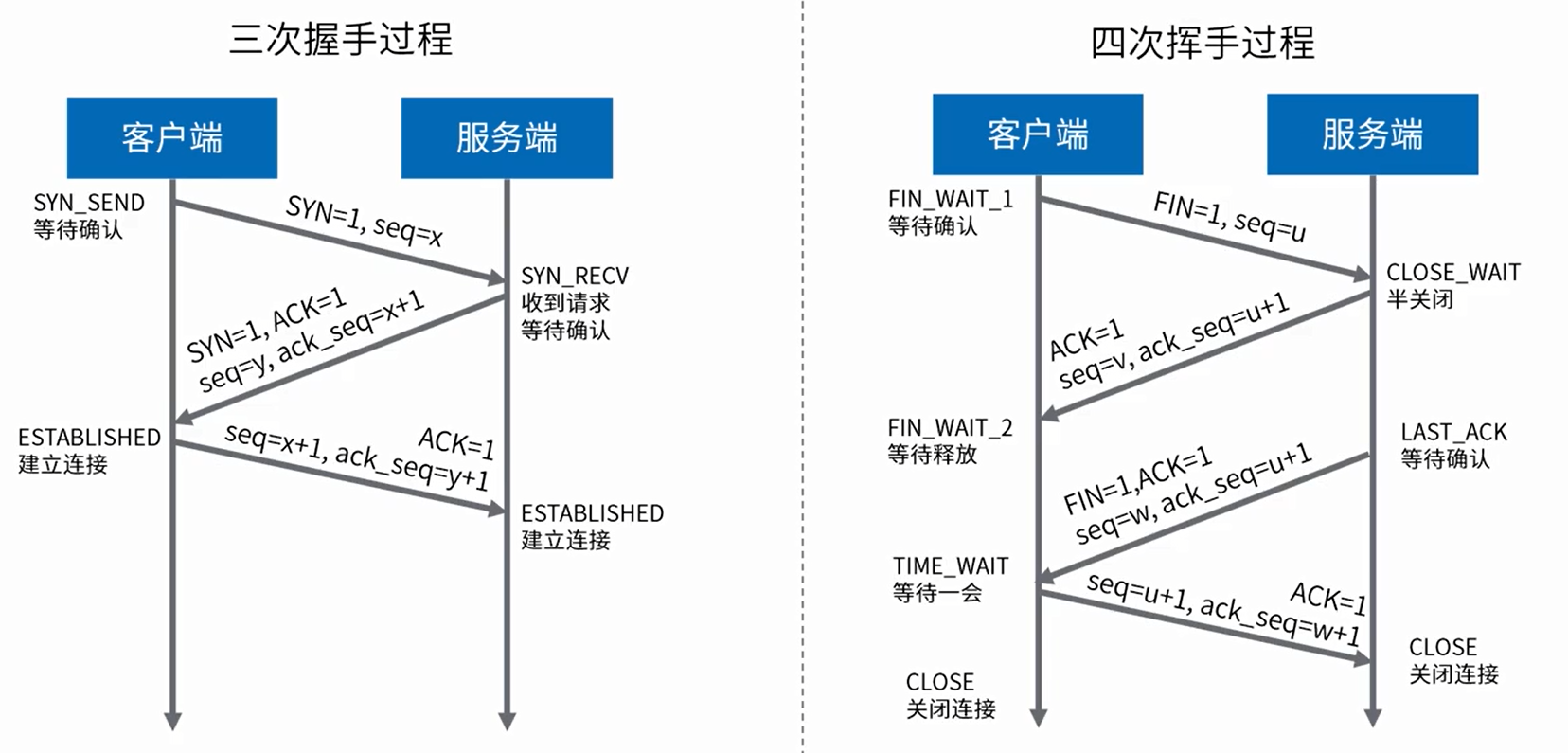
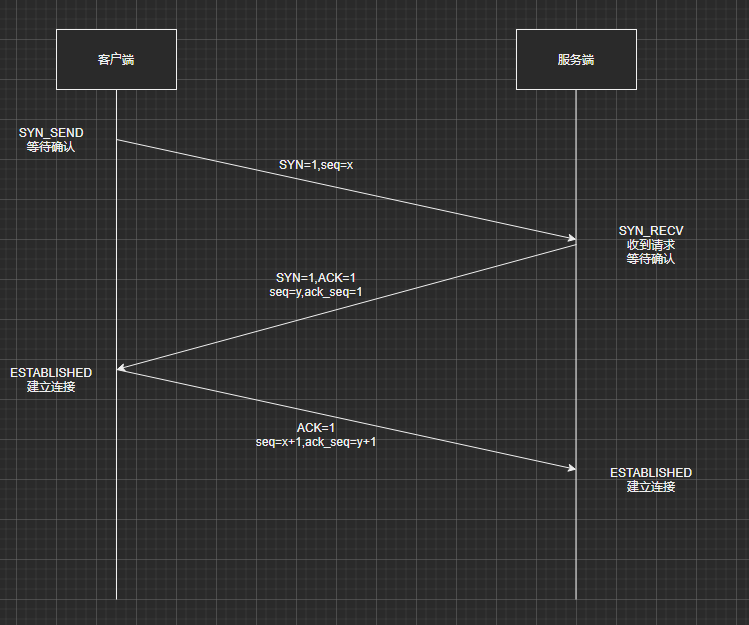
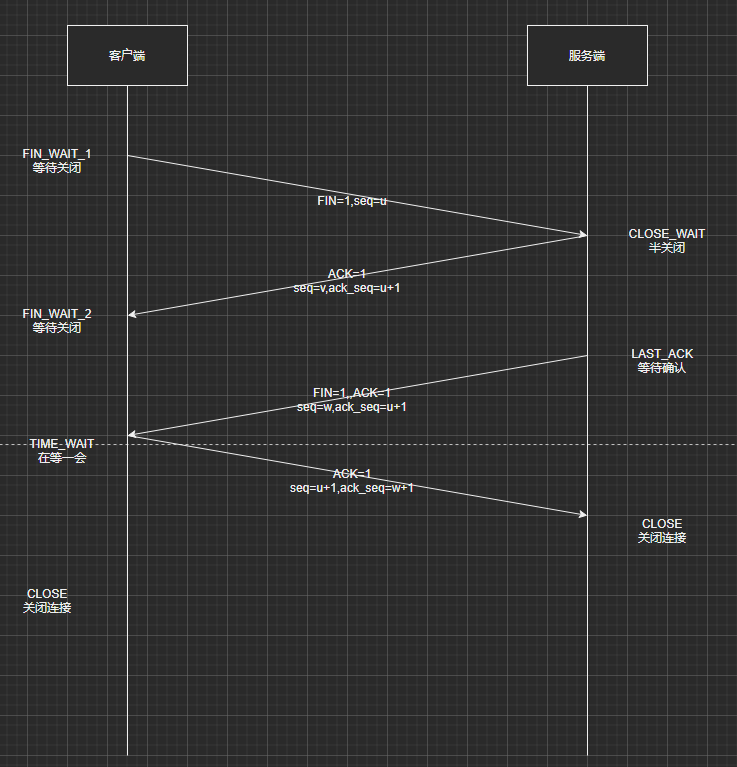
- TCP
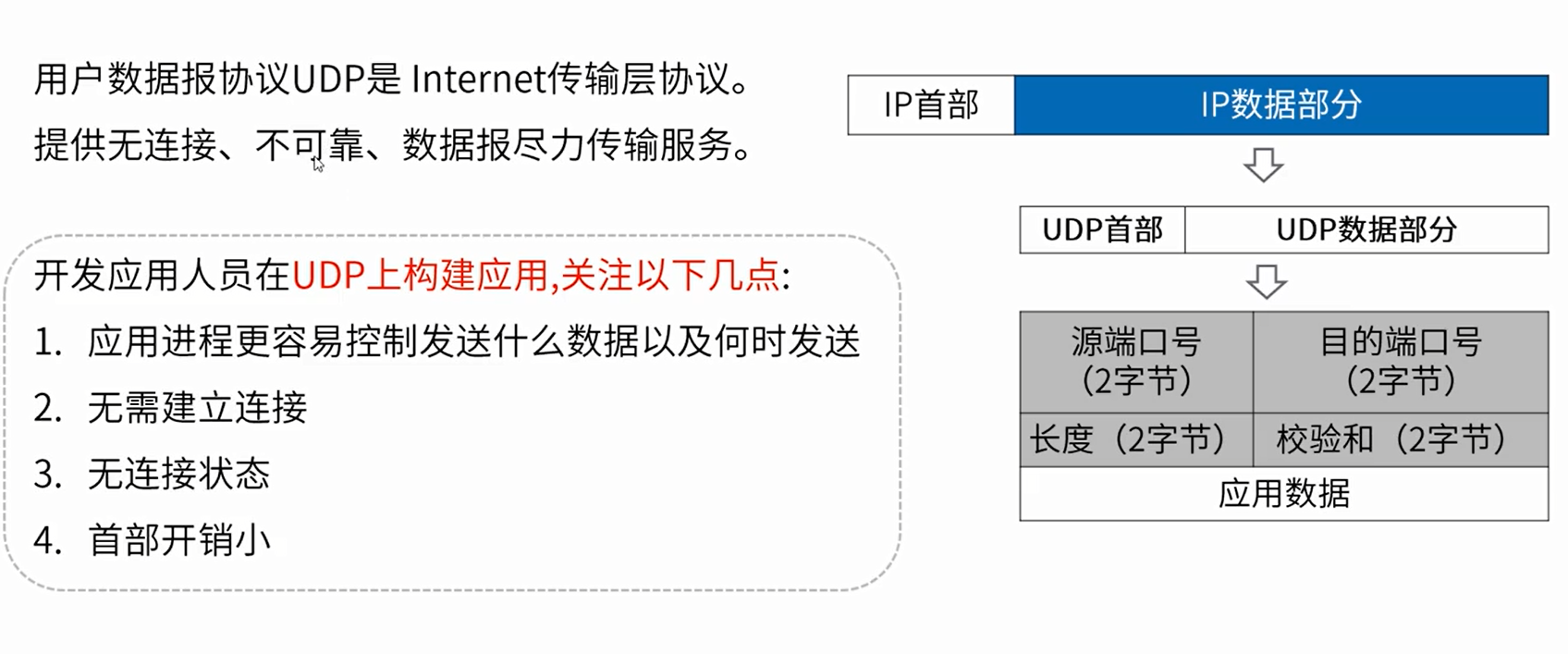
- UDP
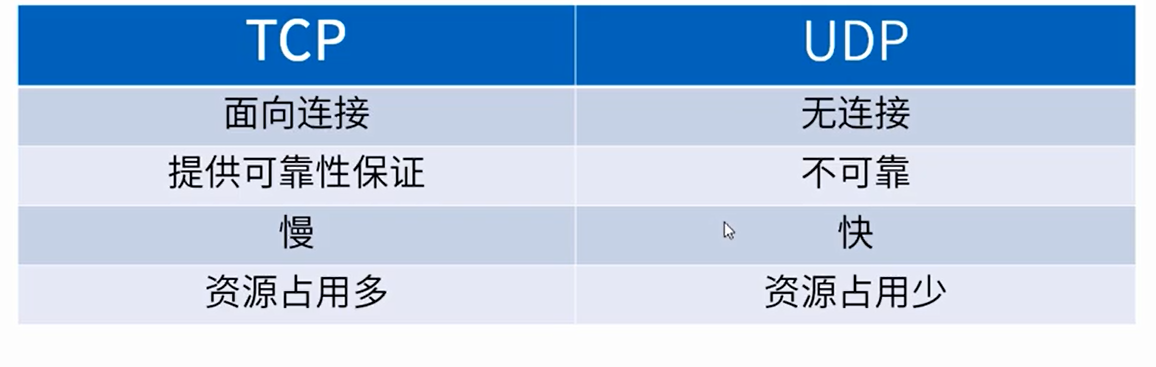
- TCP/UDP对比
# HTTP协议
# 请求数据包解析
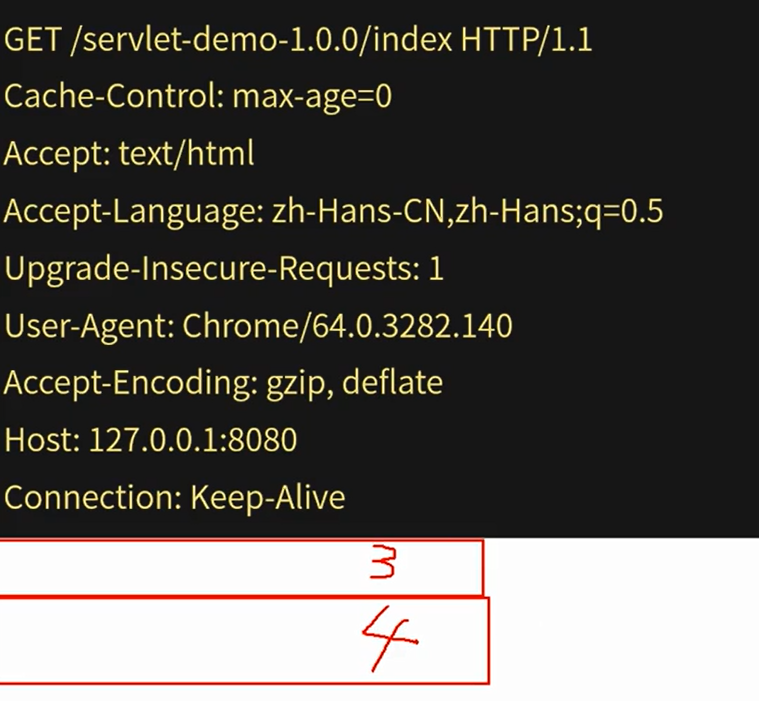
- 第一部分:请求行,请求类型,资源路径以及HTTP版本。
- 第二部分:请求头部,紧接着请求行(即第一行)之后的部分,用来说明服务器要使用的附加信息。
- 第三部分:空行,请求头部后面的空行是必须的,请求头部和数据主体之间必须有空行。
- 第四部分:请求数据,也叫主体,可以添加任意数据。
# 响应数据包解析
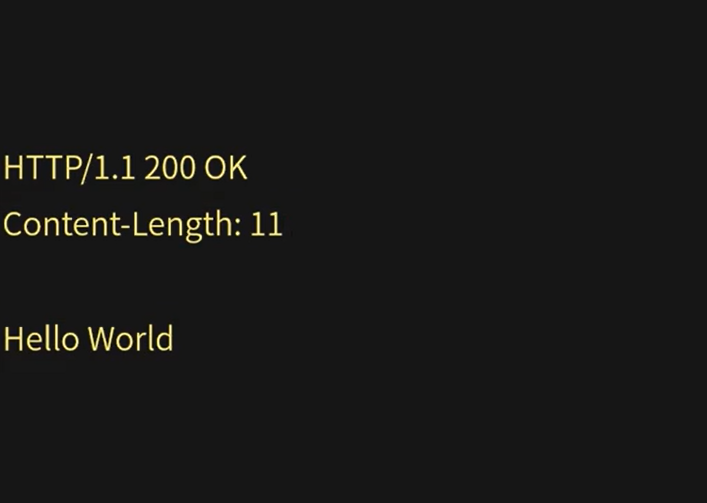
- 第一部分:HTTP码,状态码,状态消息。
- 第二部分:响应报头部,紧接着请求行(即第一行)之后的部分,用来说明服务器要使用的附加信息。
- 第三部分:空行,头部后面的空行是必须的,头部和数据主体之间必须有空行。
- 第四部分:响应正文。可以添加任意的数据。
# 响应状态码
- 1XX(临时响应)
- 表示临时响应并需要请求者继续执行操作的状态代码。
- 2XX(成功)
- 表示成功处理了请求的状态代码。
- 3XX(重定向)
- 表示要完成请求,需要进一步的操作。通常,这些状态码表示重定向。
- 4XX(请求错误)
- 这些状态码表示请求可能出错,妨碍了服务器的处理。
- 5XX(服务器错误)
- 这些状态码表示服务器在尝试处理请求时发生内部错误。这些错误可能是服务器本身的错误,而不是请求出错。
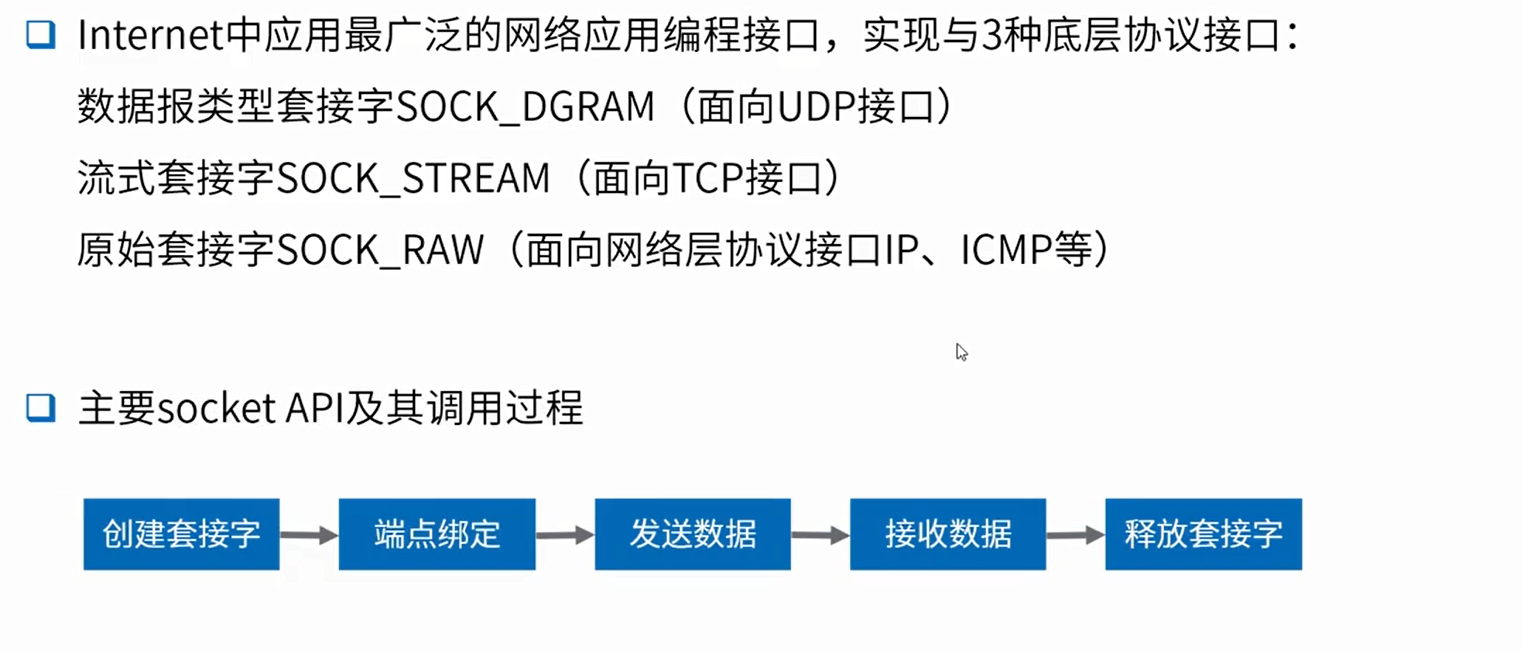
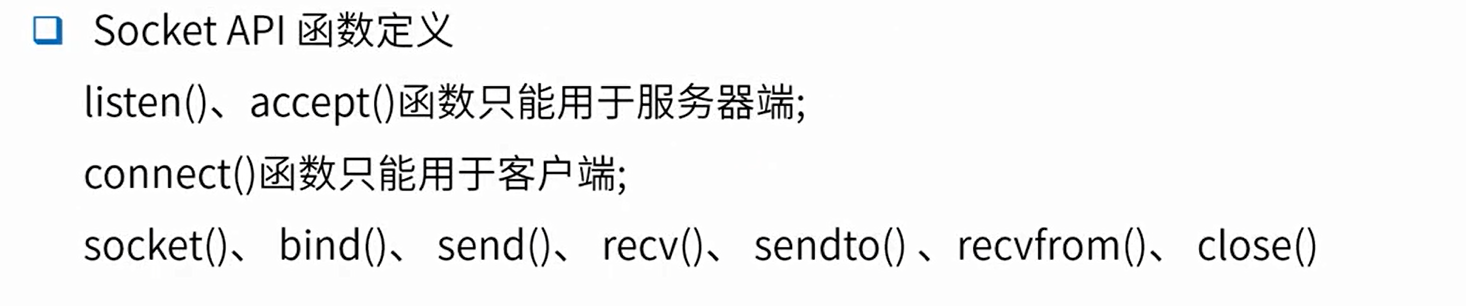
# SOCKET编程
# BIO/NIO
阻塞(blocking)IO:资源不可用时,IO请求一直阻塞,知道反馈结果(有数据或超时)。
非阻塞(non-blocking)IO:资源不可用时,IO请求离开返回,返回数据标识资源不可用。
同步(synchronous)IO:应用阻塞在发送或接收数据的状态,知道数据成功传输或返回失败。
异步(asynchronous)IO:应用在发送或接收数据时立刻返回,实际处理是异步执行的。
阻塞/非阻塞是获取资源的方式,同步/异步是程序如何处理资源的逻辑设计。
代码中使用API:ServerSocket#accept,InputStream#read都是阻塞API。
操作系统底层API中,默认Socket操作都是Blocking型的,send/recv等接口都是阻塞的。
# BIO----Blocking I/O阻塞IO
public class BIOClient {
    public static void main(String[] args) throws IOException {
        Socket socket = new Socket("localhost",8080);
        OutputStream outputStream = socket.getOutputStream();
        Scanner scanner = new Scanner(System.in);
        System.out.println("请输入");
        String msg = scanner.nextLine();
        outputStream.write(msg.getBytes());
        scanner.close();
        socket.close();
    }
}
1
2
3
4
5
6
7
8
9
10
11
12
2
3
4
5
6
7
8
9
10
11
12
public class BIOServer {
    public static void main(String[] args) throws IOException {
        ServerSocket serverSocket = new ServerSocket(8080);
        System.out.println("服务器启动成功");
        while(!serverSocket.isClosed()){
            //阻塞,知道有客户端连接
            Socket socket = serverSocket.accept();
            System.out.println("收到新连接:" + socket.toString());
            try{
                InputStream inputStream = socket.getInputStream();
                BufferedReader bufferedReader = new BufferedReader(new InputStreamReader(inputStream,"utf-8"));
                String msg;
                while((msg = bufferedReader.readLine()) != null){
                    if(msg.length() == 0){
                        break;
                    }
                    System.out.println(msg);
                }
                System.out.println("收到数据,来自:" + socket.toString());
            }catch(Exception e){
                e.printStackTrace();
            }finally{
                if(null != socket){
                    try {
                        socket.close();
                    } catch (IOException e) {
                        e.printStackTrace();
                    }
                }
            }
        }
    }
}
1
2
3
4
5
6
7
8
9
10
11
12
13
14
15
16
17
18
19
20
21
22
23
24
25
26
27
28
29
30
31
32
33
2
3
4
5
6
7
8
9
10
11
12
13
14
15
16
17
18
19
20
21
22
23
24
25
26
27
28
29
30
31
32
33
public class BIOServer1 {
    private static ExecutorService threadPool = Executors.newCachedThreadPool();
    public static void main(String[] args) throws IOException {
        ServerSocket serverSocket = new ServerSocket(8080);
        System.out.println("服务器启动成功");
        while(!serverSocket.isClosed()){
            Socket accept = serverSocket.accept();
            System.out.println("收到新连接:" + accept.toString());
            threadPool.execute(() -> {
                try{
                    InputStream inputStream = accept.getInputStream();
                    BufferedReader bufferedReader = new BufferedReader(new InputStreamReader(inputStream,"utf-8"));
                    String msg;
                    while((msg = bufferedReader.readLine()) != null){
                        if(msg.length() == 0){
                            break;
                        }
                        System.out.println(msg);
                    }
                    System.out.println("收到数据,来自" + accept.toString());
                }catch(Exception e){
                    e.printStackTrace();
                }finally{
                    if(null != accept){
                        try {
                            accept.close();
                        } catch (IOException e) {
                            e.printStackTrace();
                        }
                    }
                }
            });
        }
    }
}
1
2
3
4
5
6
7
8
9
10
11
12
13
14
15
16
17
18
19
20
21
22
23
24
25
26
27
28
29
30
31
32
33
34
35
2
3
4
5
6
7
8
9
10
11
12
13
14
15
16
17
18
19
20
21
22
23
24
25
26
27
28
29
30
31
32
33
34
35
public class BIOServer2 {
    private static ExecutorService threadPool = Executors.newCachedThreadPool();
    public static void main(String[] args) throws IOException {
        ServerSocket serverSocket = new ServerSocket(8080);
        System.out.println("服务器启动成功");
        while(!serverSocket.isClosed()){
            Socket accept = serverSocket.accept();
            System.out.println("收到新连接:" + accept.toString());
            threadPool.execute(() -> {
                try{
                    InputStream inputStream = accept.getInputStream();
                    BufferedReader bufferedReader = new BufferedReader(new InputStreamReader(inputStream,"utf-8"));
                    String msg;
                    while((msg = bufferedReader.readLine()) != null){
                        if(msg.length() == 0){
                            break;
                        }
                        System.out.println(msg);
                    }
                    System.out.println("收到数据,来自" + accept.toString());
                    //响应结果
                    OutputStream outputStream = accept.getOutputStream();
                    outputStream.write("HTTP/1.1 200 OK\r\n".getBytes());
                    outputStream.write("Content-Length: 11\r\n\r\n".getBytes());
                    outputStream.write("Hello World".getBytes());
                }catch(Exception e){
                    e.printStackTrace();
                }finally{
                    if(null != accept){
                        try {
                            accept.close();
                        } catch (IOException e) {
                            e.printStackTrace();
                        }
                    }
                }
            });
        }
    }
}
1
2
3
4
5
6
7
8
9
10
11
12
13
14
15
16
17
18
19
20
21
22
23
24
25
26
27
28
29
30
31
32
33
34
35
36
37
38
39
40
2
3
4
5
6
7
8
9
10
11
12
13
14
15
16
17
18
19
20
21
22
23
24
25
26
27
28
29
30
31
32
33
34
35
36
37
38
39
40
# NIO----Non-Blocking I/O非阻塞IO-也可以称new io
- 始于Java1.4,提供了新的Java IO操作非阻塞API。用于代替io和net相关API。
- NIO有三个核心组件
- Buffer缓冲区
- 缓冲区本质上是一个可以写入数据的内存块(类似数组),然后可以再次读取。此内存块包含在NIO Buffer对象中,该对象提供了一组方法,可以更轻松地使用内存块。
- 相比较直接对数组的操作,BufferAPI更加容易操作和管理。
- 使用Buffer进行数据写入与读取,需要进行如下四个步骤:
- 1.将数据写入缓冲区
- 2.调用buffer.flip(),转换为读取模式
- 3.缓冲区读取数据
- 4.调用buffer.clear()或buffer.compact()清除缓存
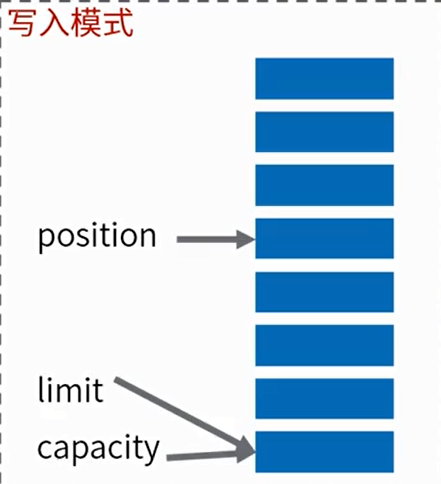
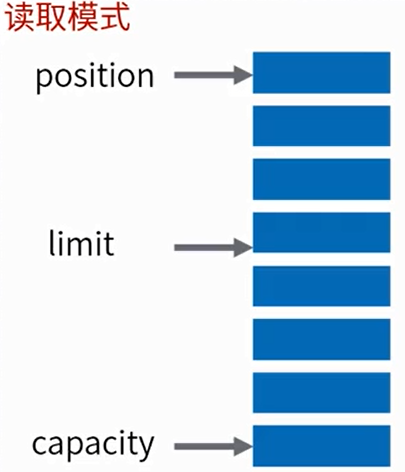
- Buffer三个重要属性:
- capacity容量:作为一个内存块,Buffer具有一定的固定大小,也称为“容量”。
- position位置:写入模式时代表写数据的位置。读取模式时代表读取数据的位置。
- limit 限制:写入模式,限制等于buffer的容量。读取模式下,limit等于写入的数据量。
- 写入模式
- 读取模式
- Buffer内存模型
- ByteBuffer为性能关键型代码提供了**直接内存(direct堆外)和非直接内存(heap堆)**两种实现。
- 堆外内存获取的方式:ByteBuffer directByteBuffer=ByteBuffer.allocateDirect(noBytes);
- 好处:
- 1、进行网络IO或者文件IO时比heapBuffer少一次拷贝。(file/socket---OS memory----jvm heap)GC会移动对象内存,在写file或socket的过程中,JVM的实现中,会先把数据复制到堆外,再进行写入。
- 2、GC范围之外,降低GC压力,但实现了自动管理。DirectByteBuffer中有一个Cleaner对象(PhantomReference),Cleaner被GC前会执行clean方法,触发DirectByteBuffer中定义的Deallocator建议:
- 1、性能确实可观的时候才去使用;分配给大型、长寿命;(网络传输、文件读写场景)
- 2、通过虚拟机参数MaxDirectMemorySize限制大小,防止耗尽整个机器的内存;
- Channel通道
- Channel
- Channel的API涵盖了UDP/TCP网络和文件IO
- FileChannel
- DatagramChannel
- SocketChannel
- SocketChannel用于建立TCP网络连接,类似java.net.Socket。有两种创建socketChannel形式:
- 1.客户端主动发起和服务器的连接。
- 2.服务端获取的新连接。
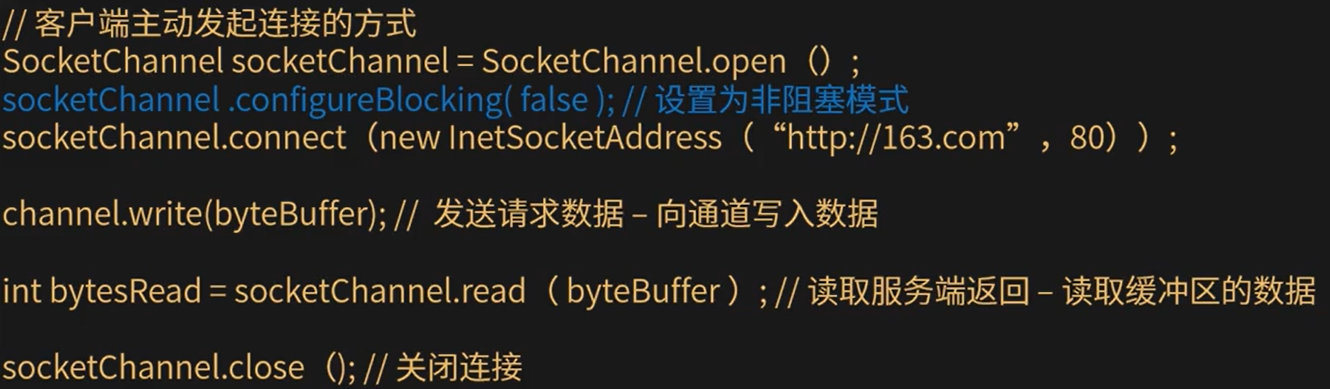
- write写:write()在尚未写入任何内容时就可能返回了。需要在循环中调用write()。
- read读:read()方法可能直接返回而根本不读取任何数据,根据返回的int值判断读取了多少字节。
- SocketChannel用于建立TCP网络连接,类似java.net.Socket。有两种创建socketChannel形式:
- ServerSocketChannel
- ServerSocketChannel可以监听新建的TCP连接通道,类似ServerSocket。
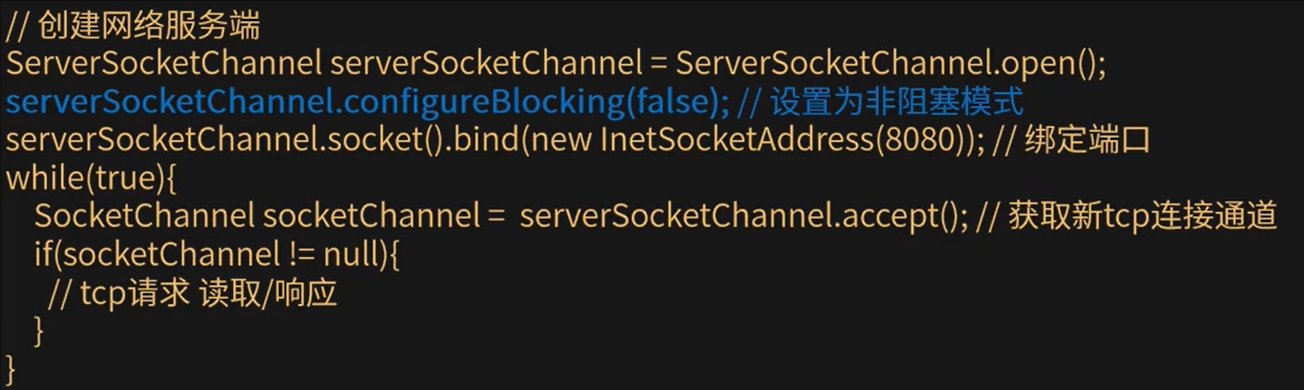
- serverSocketChannel.accept():如果该通道处于非阻塞模式,那么如果没有挂起的连接,该方法将立即返回null。必须检查返回的SocketChannel是否为null。
- Channel和标准IO加Stream操作的对比
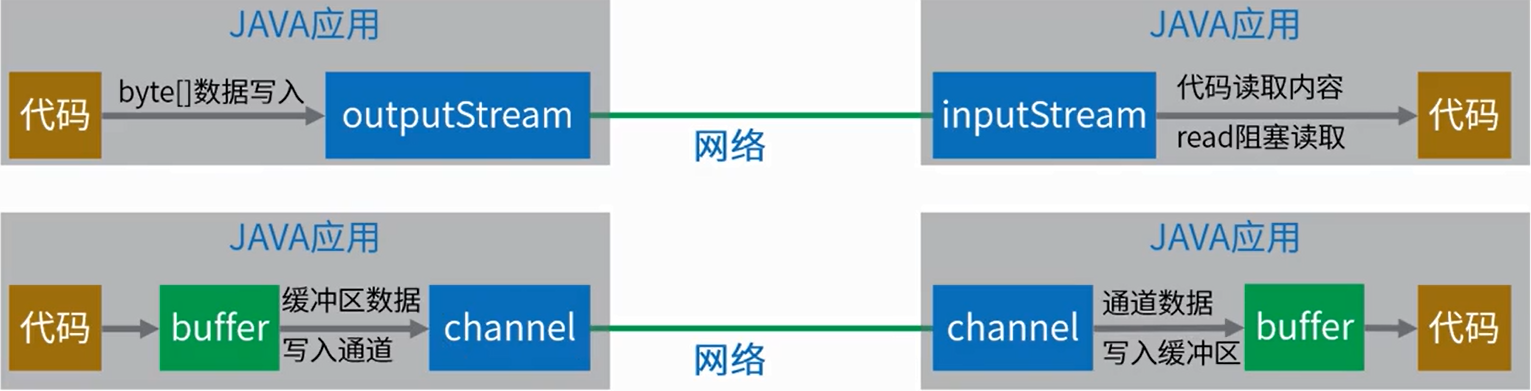
- 和标准IO Stream操作的区别:
- 在一个通道内进行读取和写入
- stream通常是单向的(input或output)
- 可以非阻塞读取和写入通道
- 通道始终读取或写入缓冲区
- Channel
- Selector选择器
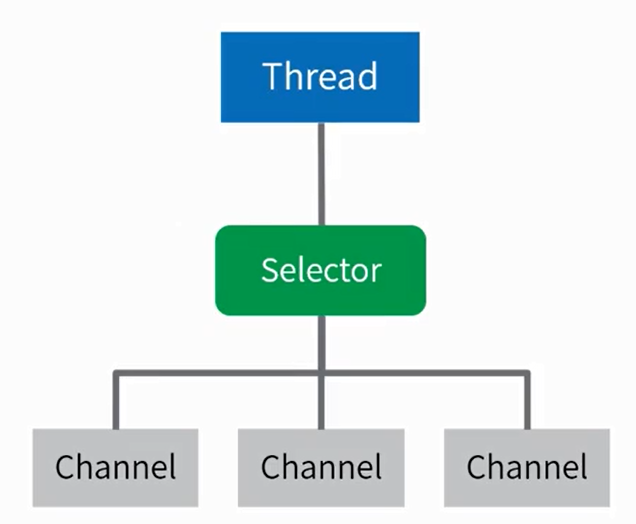
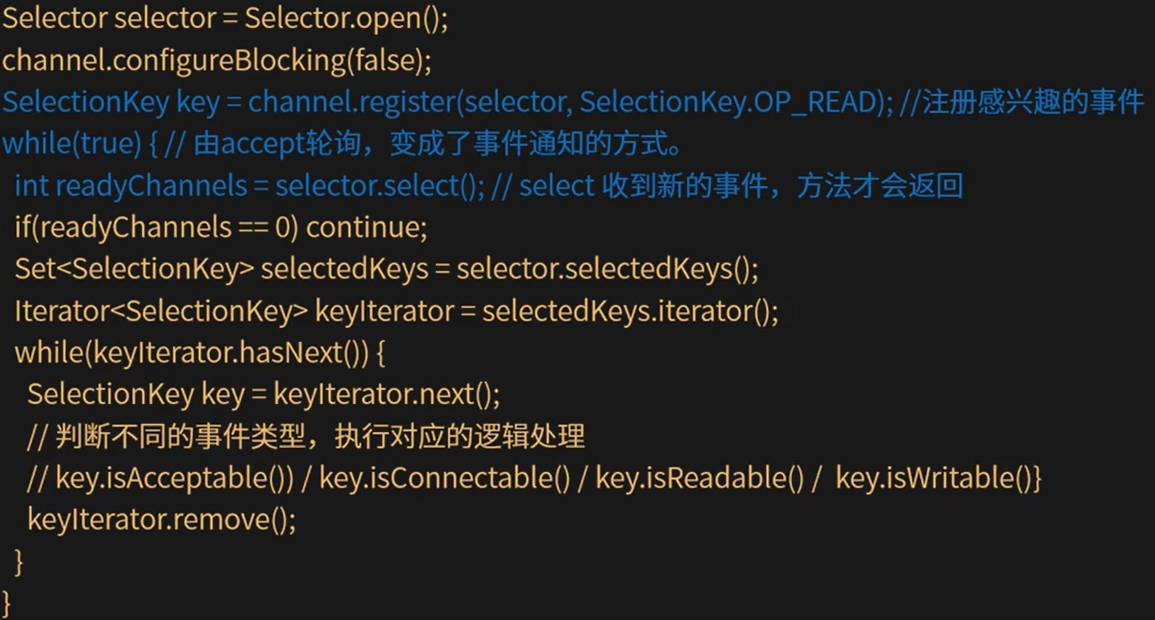
- Selector是一个Java NIO组件,可以检查一个或多个NIO通道,并确定哪些通道已准备好进行读取或写入。实现单个线程可以管理多个通道,从而管理多个网络连接。
- 一个线程使用Selector监听多个channel的不同事件:四个事件分别对应SelectionKey四个常量。
- 1.Connect 连接(SelectionKey.OP_CONNECT)
- 2.Accept 准备就绪(OP_ACCEPT)
- 3.Read 读取(OP_READ)
- 4.Write 写入(OP_WRITE)
- 实现一个线程处理多个通道的核心概念理解:事件驱动机制。
- 非阻塞的网络通道下,开发者通过Selector注册对于通道感兴趣的事件类型,线程通过监听事件来触发相应的代码执行。(拓展:更底层是操作系统的多路复用机制)
- Buffer缓冲区
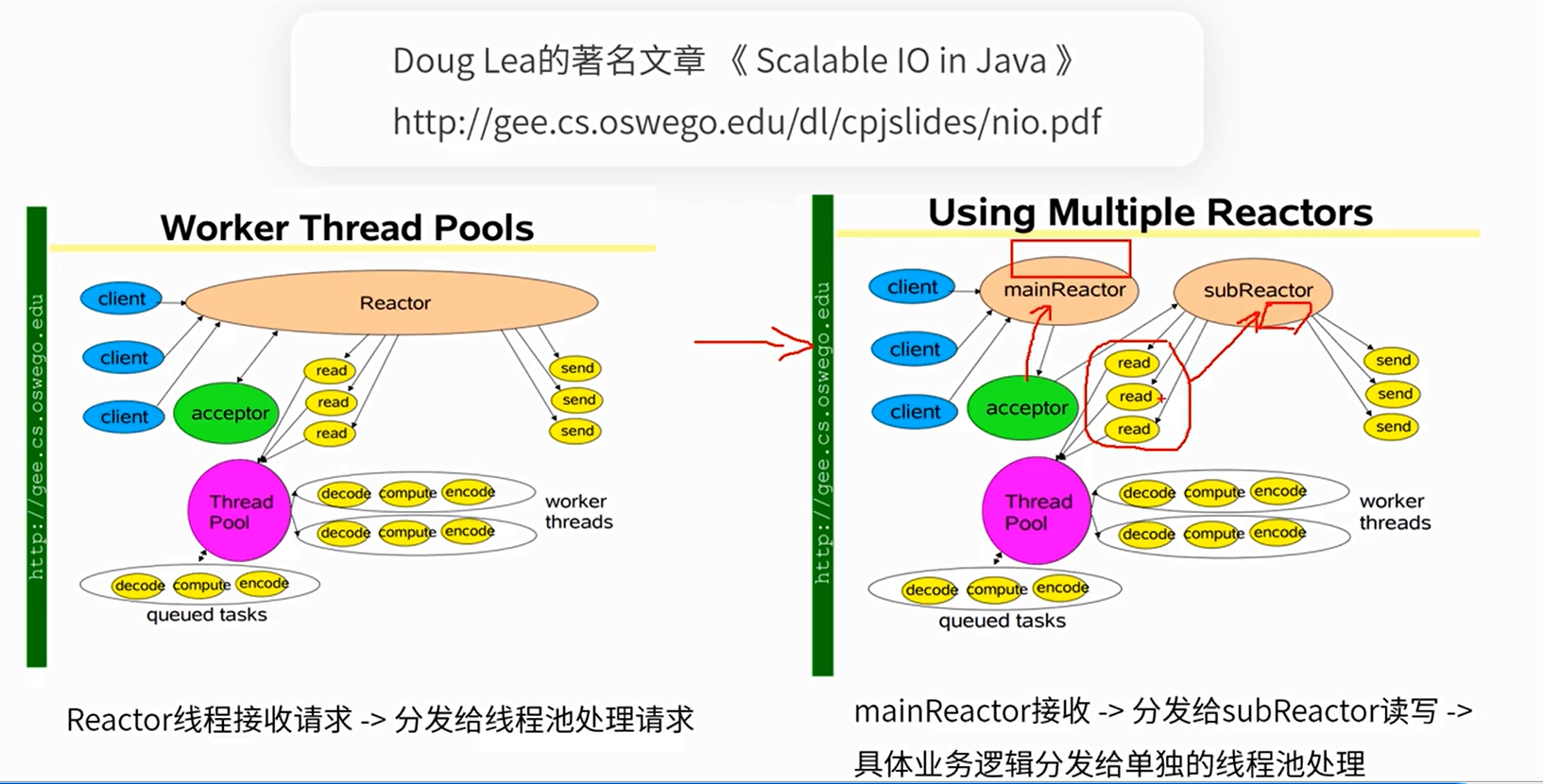
- NIO和多线程结合
- 小结
- NIO为开发者提供了功能丰富及强大的IO处理API,但是在应用于网络应用开发的过程中,直接使用JDK提供的API,比较繁琐。而且要想将性能进行提升,光有NIO还不够,还需要将多线程技术与之结合起来。
- 因为网络编程本身的复杂性,以及JDKAPI开发的使用难度较高,所以在开源社区中,涌出来很多对JDKNIO进行封装、增强后的网络编程框架,例如:Netty、Mina等。
- Demo
public class NIOClient {
    public static void main(String[] args) throws IOException {
        SocketChannel socketChannel = SocketChannel.open();
        socketChannel.configureBlocking(false);
        socketChannel.connect(new InetSocketAddress("127.0.0.1",8080));
        while(!socketChannel.finishConnect()){
            //没有连上,一直等待
            Thread.yield();
        }
        Scanner scanner = new Scanner(System.in);
        System.out.println("请输入:");
        //发送内容
        String msg = scanner.nextLine();
        ByteBuffer requestByteBuffer = ByteBuffer.wrap(msg.getBytes());
        while(requestByteBuffer.hasRemaining()){
            socketChannel.write(requestByteBuffer);
        }
        //读取响应
        System.out.println("收到服务端响应");
        ByteBuffer responseByteBuffer = ByteBuffer.allocate(1024);
        while(socketChannel.isOpen() && socketChannel.read(responseByteBuffer) != -1){
            //长连接情况下,需要手动判断数据有没有读取结束,此处做一个简单的判断,超过0字节就认为请求结束了
            if(responseByteBuffer.position() > 0){
                break;
            }
        }
        responseByteBuffer.flip();
        byte[] content = new byte[responseByteBuffer.limit()];
        responseByteBuffer.get(content);
        System.out.println(new String(content));
        scanner.close();
        socketChannel.close();
    }
}
1
2
3
4
5
6
7
8
9
10
11
12
13
14
15
16
17
18
19
20
21
22
23
24
25
26
27
28
29
30
31
32
33
34
2
3
4
5
6
7
8
9
10
11
12
13
14
15
16
17
18
19
20
21
22
23
24
25
26
27
28
29
30
31
32
33
34
public class NIOServer {
    public static void main(String[] args) throws IOException {
        ServerSocketChannel serverSocketChannel = ServerSocketChannel.open();
        serverSocketChannel.configureBlocking(false);
        serverSocketChannel.socket().bind(new InetSocketAddress(8080));
        System.out.println("启动成功");
        while(true){
            //获取新的tcp通道
            SocketChannel socketChannel = serverSocketChannel.accept();
            if(null != socketChannel){
                System.out.println("收到新连接:" + socketChannel.toString());
                //默认是阻塞的,一定要设置成非阻塞
                socketChannel.configureBlocking(false);
                try{
                    ByteBuffer requestBuffer = ByteBuffer.allocate(1024);
                    while(socketChannel.isOpen() && socketChannel.read(requestBuffer) != -1){
                        //长连接情况下,需要手动判断数据有没有读取结束(此处做一个简单的判断:超过0字节就认为请求结束了)
                        if(requestBuffer.position() > 0){
                            break;
                        }
                    }
                    //如果没有数据了,就不继续后面的处理
                    if(requestBuffer.position() == 0){
                        continue;
                    }
                    requestBuffer.flip();
                    byte[] content = new byte[requestBuffer.limit()];
                    requestBuffer.get(content);
                    System.out.println(new String(content));
                    System.out.println("收到数据,来自:" + socketChannel.toString());
                    // 响应结果 200
                    String response = "HTTP/1.1 200 OK\r\n" +
                            "Content-Length: 11\r\n\r\n" +
                            "Hello World";
                    ByteBuffer buffer = ByteBuffer.wrap(content);
                    while(buffer.hasRemaining()){
                        //非阻塞
                        socketChannel.write(buffer);
                    }
                }catch(Exception e){
                    e.printStackTrace();
                }finally{

                }
            }
        }
    }
}
1
2
3
4
5
6
7
8
9
10
11
12
13
14
15
16
17
18
19
20
21
22
23
24
25
26
27
28
29
30
31
32
33
34
35
36
37
38
39
40
41
42
43
44
45
46
47
48
2
3
4
5
6
7
8
9
10
11
12
13
14
15
16
17
18
19
20
21
22
23
24
25
26
27
28
29
30
31
32
33
34
35
36
37
38
39
40
41
42
43
44
45
46
47
48
public class NIOServer1 {
    private static ArrayList<SocketChannel> channels = new ArrayList<>();
    public static void main(String[] args) throws IOException {
        //创建网络服务端
        ServerSocketChannel serverSocketChannel = ServerSocketChannel.open();
        serverSocketChannel.configureBlocking(false);
        serverSocketChannel.socket().bind(new InetSocketAddress(8080));
        System.out.println("启动成功");
        while(true){
            //获取新tcp连接通道
            SocketChannel socketChannel = serverSocketChannel.accept();
            if(null != socketChannel){
                System.out.println("收到新连接:" + socketChannel.toString());
                socketChannel.configureBlocking(false);
                channels.add(socketChannel);
            }
            //没有新连接的情况下,就去处理现有连接,处理完就删掉
            else{
                Iterator<SocketChannel> iterator = channels.iterator();
                while(iterator.hasNext()){
                    SocketChannel sc = iterator.next();
                    try{
                        ByteBuffer requestByteBuffer = ByteBuffer.allocate(1024);
                        //读到的数据为0,代表这个通道没有数据需要处理,那就待会再处理
                        if(sc.read(requestByteBuffer) == 0){
                            continue;
                        }
                        //长连接情况下,需要手动判断读取有没有结束(这里做一个简单的判断:超过0字节就认为请求结束)
                        while(sc.isOpen() && sc.read(requestByteBuffer) != -1){
                            if(requestByteBuffer.position() > 0){
                                break;
                            }
                        }
                        //如果没有数据了,就不继续后面的处理
                        if(requestByteBuffer.position() == 0){
                            continue;
                        }
                        requestByteBuffer.flip();
                        byte[] content = new byte[requestByteBuffer.limit()];
                        requestByteBuffer.get(content);
                        System.out.println(new String(content));
                        System.out.println("收到数据,来自:" + sc.toString());
                        // 响应结果 200
                        String response = "HTTP/1.1 200 OK\r\n" +
                                "Content-Length: 11\r\n" +
                                "Hello World";
                        ByteBuffer buffer = ByteBuffer.wrap(response.getBytes());
                        while(buffer.hasRemaining()){
                            sc.write(buffer);
                        }
                        iterator.remove();
                    }catch(Exception e){
                        e.printStackTrace();
                    }finally{

                    }
                }
            }
        }
    }
}
1
2
3
4
5
6
7
8
9
10
11
12
13
14
15
16
17
18
19
20
21
22
23
24
25
26
27
28
29
30
31
32
33
34
35
36
37
38
39
40
41
42
43
44
45
46
47
48
49
50
51
52
53
54
55
56
57
58
59
60
61
2
3
4
5
6
7
8
9
10
11
12
13
14
15
16
17
18
19
20
21
22
23
24
25
26
27
28
29
30
31
32
33
34
35
36
37
38
39
40
41
42
43
44
45
46
47
48
49
50
51
52
53
54
55
56
57
58
59
60
61
public class NIOServerV2 {
    public static void main(String[] args) throws IOException {
        //1.创建网络服务端ServerSocketChannel
        ServerSocketChannel serverSocketChannel = ServerSocketChannel.open();
        serverSocketChannel.configureBlocking(false);
        //2.构建一个Selector选择器,并且把Channel注册上去
        Selector selector = Selector.open();
        //将serverSocketChannel注册到selector
        SelectionKey selectionKey = serverSocketChannel.register(selector,0,serverSocketChannel);
        //对serverSocketChannel上面的accept事件感兴趣(serverSocketChannel只能支持accept操作)
        selectionKey.interestOps(SelectionKey.OP_ACCEPT);
        //3.绑定端口
        serverSocketChannel.socket().bind(new InetSocketAddress(8080));
        System.out.println("启动成功");
        while(true){
            //不在轮询通道,改用下面轮询事件的方式。select方法有阻塞效果,直到有事件通知才会返回
            selector.select();
            //获取事件
            Set<SelectionKey> selectionKeys = selector.selectedKeys();
            //遍历查询结果
            Iterator<SelectionKey> selectionKeyIterator = selectionKeys.iterator();
            while(selectionKeyIterator.hasNext()){
                //被封装的查询结果
                SelectionKey key = selectionKeyIterator.next();
                selectionKeyIterator.remove();
                //关注read和accept事件
                if(key.isAcceptable()){
                    ServerSocketChannel server = (ServerSocketChannel)key.attachment();
                    //将拿到的客户端连接通道注册到selector上面
                    //mainReactor 轮询accept
                    SocketChannel clientSocketChannel = server.accept();
                    clientSocketChannel.configureBlocking(false);
                    clientSocketChannel.register(selector,SelectionKey.OP_READ,clientSocketChannel);
                    System.out.println("收到新连接:" + clientSocketChannel.toString());
                }
                if(key.isReadable()){
                    SocketChannel socketChannel = (SocketChannel)key.attachment();
                    try{
                        ByteBuffer requestByteBuffer = ByteBuffer.allocate(1024);
                        //长连接情况下,需要手动判断数据有没有读取结束(此处做一个简单的处理,超过0字节就认为请求结束了)
                        while(socketChannel.isOpen() && socketChannel.read(requestByteBuffer) != -1){
                            if(requestByteBuffer.position() > 0){
                                break;
                            }
                        }
                        //如果没有数据了,就不做后面的处理
                        if(requestByteBuffer.position() == 0){
                            continue;
                        }
                        requestByteBuffer.flip();
                        byte[] content = new byte[requestByteBuffer.limit()];
                        requestByteBuffer.get(content);
                        System.out.println(new String(content));
                        System.out.println("收到数据,来自" + socketChannel.toString());
                        //响应结果
                        String response = "HTTP/1.1 200 OK\r\n" +
                                "Content-Length: 11\r\n\r\n" +
                                "Hello World";
                        ByteBuffer buffer = ByteBuffer.wrap(response.getBytes());
                        while(buffer.hasRemaining()){
                            socketChannel.write(buffer);
                        }
                    }catch(Exception e){
                        e.printStackTrace();
                        key.cancel(); // 取消事件订阅
                    }finally{

                    }
                }
            }
            selector.selectNow();
        }
    }
}
1
2
3
4
5
6
7
8
9
10
11
12
13
14
15
16
17
18
19
20
21
22
23
24
25
26
27
28
29
30
31
32
33
34
35
36
37
38
39
40
41
42
43
44
45
46
47
48
49
50
51
52
53
54
55
56
57
58
59
60
61
62
63
64
65
66
67
68
69
70
71
72
73
74
2
3
4
5
6
7
8
9
10
11
12
13
14
15
16
17
18
19
20
21
22
23
24
25
26
27
28
29
30
31
32
33
34
35
36
37
38
39
40
41
42
43
44
45
46
47
48
49
50
51
52
53
54
55
56
57
58
59
60
61
62
63
64
65
66
67
68
69
70
71
72
73
74
public class NIOServerV3 {
    /**处理业务的线程池**/
    private static ExecutorService workPool = Executors.newCachedThreadPool();
    private ServerSocketChannel serverSocketChannel;
    //1.创建多个线程 - accept处理reactor线程(accept线程)
    private ReactorThread[] mainReactorThreads = new ReactorThread[1];
    //2.创建多个线程 - io处理reactor线程(I/O线程)
    private ReactorThread[] subReactorThreads = new ReactorThread[8];
    /**
     * 封装了selector.select()等事件轮询的代码
     */
    abstract class ReactorThread extends Thread{
        volatile boolean running = false;
        Selector selector;
        LinkedBlockingQueue<Runnable> taskQueue = new LinkedBlockingQueue<>();
        /**
         * Selector监听到有事件后,调用这个方法
         * @param channel
         * @throws Exception
         */
        public abstract void handler(SelectableChannel channel) throws Exception;
        private ReactorThread() throws Exception{
            selector = Selector.open();
        }
        @Override
        public void run(){
            //轮询Selector事件
            while(running){
                try{
                    //执行队列中的任务
                    Runnable task;
                    while((task = taskQueue.poll()) != null){
                        task.run();
                    }
                    selector.select(1000);
                    //获取查询结果
                    Set<SelectionKey> selected = selector.selectedKeys();
                    Iterator<SelectionKey> iter = selected.iterator();
                    while(iter.hasNext()){
                        //被封装的查询结果
                        SelectionKey key = iter.next();
                        iter.remove();
                        int readyOps = key.readyOps();
                        //关注Accept和Read两个事件
                        if((readyOps & (SelectionKey.OP_READ | SelectionKey.OP_ACCEPT)) != 0 || readyOps == 0){
                            try{
                                SelectableChannel channel = (SelectableChannel)key.attachment();
                                channel.configureBlocking(false);
                                handler(channel);
                                //如果关闭了,就取消这个key的订阅
                                if(!channel.isOpen()){
                                    key.cancel();
                                }
                            }catch(Exception e){
                                e.printStackTrace();
                                //如果有异常,就取消这个key的订阅
                                key.cancel();
                            }
                        }
                    }
                    selector.selectNow();
                }catch(Exception e){
                    e.printStackTrace();
                }
            }
        }
        private SelectionKey register(SelectableChannel channel) throws Exception{
            //为什么register要以任务提交的形式,让reactor线程去处理?
            //因为线程执行channel注册到selector的过程中,会和调用selector.select()方法的线程争同一把锁
            //而select()方法是在eventLoop中通过while循环调用的,争抢的可能性很高,为了让register能更快的执行,就放到同一个线程来处理
            FutureTask<SelectionKey> futureTask = new FutureTask<>(() -> channel.register(selector,0,channel));
            taskQueue.add(futureTask);
            return futureTask.get();
        }
        private void doStart(){
            if(!running){
                running = true;
                start();
            }
        }
    }
    private void newGroup() throws Exception {
        //创建IO线程,负责处理客户端连接以后socketChannel的IO读写
        for(int i = 0; i < subReactorThreads.length; i++){
            subReactorThreads[i] = new ReactorThread(){
                @Override
                public void handler(SelectableChannel channel) throws Exception{
                    //work线程只负责IO处理,不处理accept事件
                    SocketChannel sc = (SocketChannel)channel;
                    ByteBuffer requestBuffer = ByteBuffer.allocate(1024);
                    while(sc.isOpen() && sc.read(requestBuffer) != 0){
                        //长连接情况下,需要手动判断数据有没有读取结束(此处做一个简单的判断:超过0字节就认为请求结束了)
                        if(requestBuffer.position() > 0){
                            break;
                        }
                    }
                    //如果没有数据了,则不继续后面的处理
                    if(requestBuffer.position() == 0){
                        return;
                    }
                    requestBuffer.flip();
                    byte[] content = new byte[requestBuffer.limit()];
                    System.out.println(new String(content));
                    System.out.println("收到数据,来自:" + sc.toString());
                    // TODO 业务操作 数据库、接口...
                    workPool.submit(() -> {
                    });
                    // 响应结果 200
                    String response = "HTTP/1.1 200 OK\r\n" +
                            "Content-Length: 11\r\n\r\n" +
                            "Hello World";
                    ByteBuffer buffer = ByteBuffer.wrap(response.getBytes());
                    while (buffer.hasRemaining()) {
                        sc.write(buffer);
                    }
                }
            };
        }
        //创建mainReactor线程,只负责处理serverSocketChannel
        for(int i = 0; i < mainReactorThreads.length; i++){
            mainReactorThreads[i] = new ReactorThread() {
                AtomicInteger incr = new AtomicInteger(0);
                @Override
                public void handler(SelectableChannel channel) throws Exception {
                    //只做请求分发,不做具体的数据读取
                    ServerSocketChannel ch = (ServerSocketChannel) channel;
                    SocketChannel socketChannel = ch.accept();
                    socketChannel.configureBlocking(false);
                    int index = incr.incrementAndGet() % subReactorThreads.length;
                    ReactorThread workEventLoop = subReactorThreads[index];
                    workEventLoop.doStart();
                    SelectionKey selectionKey = workEventLoop.register(socketChannel);
                    selectionKey.interestOps(SelectionKey.OP_READ);
                    System.out.println(Thread.currentThread().getName() + "收到新连接:" + socketChannel.toString());
                }
            };
        }
    }

    /**
     * 初始化channel,并绑定一个eventLoop线程
     * @throws Exception
     */
    private void initAndRegister() throws Exception{
        //1.创建ServerSocketChannel
        serverSocketChannel = ServerSocketChannel.open();
        serverSocketChannel.configureBlocking(false);
        //2.将ServerSocketChannel注册到Selector
        int index = new Random().nextInt(mainReactorThreads.length);
        mainReactorThreads[index].doStart();
        SelectionKey selectionKey = mainReactorThreads[index].register(serverSocketChannel);
        selectionKey.interestOps(SelectionKey.OP_ACCEPT);
    }

    /**
     * 绑定端口
     * @throws Exception
     */
    private void bind() throws Exception{
        serverSocketChannel.bind(new InetSocketAddress(8080));
        System.out.println("启动完成,端口:8080");
    }

    public static void main(String[] args) throws Exception {
        NIOServerV3 nioServerV3 = new NIOServerV3();
        // 1、 创建main和sub两组线程
        nioServerV3.newGroup();
        // 2、 创建serverSocketChannel,注册到mainReactor线程上的selector上
        nioServerV3.initAndRegister();
        // 3、 为serverSocketChannel绑定端口
        nioServerV3.bind();
    }
}
1
2
3
4
5
6
7
8
9
10
11
12
13
14
15
16
17
18
19
20
21
22
23
24
25
26
27
28
29
30
31
32
33
34
35
36
37
38
39
40
41
42
43
44
45
46
47
48
49
50
51
52
53
54
55
56
57
58
59
60
61
62
63
64
65
66
67
68
69
70
71
72
73
74
75
76
77
78
79
80
81
82
83
84
85
86
87
88
89
90
91
92
93
94
95
96
97
98
99
100
101
102
103
104
105
106
107
108
109
110
111
112
113
114
115
116
117
118
119
120
121
122
123
124
125
126
127
128
129
130
131
132
133
134
135
136
137
138
139
140
141
142
143
144
145
146
147
148
149
150
151
152
153
154
155
156
157
158
159
160
161
162
163
164
165
166
167
168
169
170
171
172
173
2
3
4
5
6
7
8
9
10
11
12
13
14
15
16
17
18
19
20
21
22
23
24
25
26
27
28
29
30
31
32
33
34
35
36
37
38
39
40
41
42
43
44
45
46
47
48
49
50
51
52
53
54
55
56
57
58
59
60
61
62
63
64
65
66
67
68
69
70
71
72
73
74
75
76
77
78
79
80
81
82
83
84
85
86
87
88
89
90
91
92
93
94
95
96
97
98
99
100
101
102
103
104
105
106
107
108
109
110
111
112
113
114
115
116
117
118
119
120
121
122
123
124
125
126
127
128
129
130
131
132
133
134
135
136
137
138
139
140
141
142
143
144
145
146
147
148
149
150
151
152
153
154
155
156
157
158
159
160
161
162
163
164
165
166
167
168
169
170
171
172
173
# NIO和BIO对比
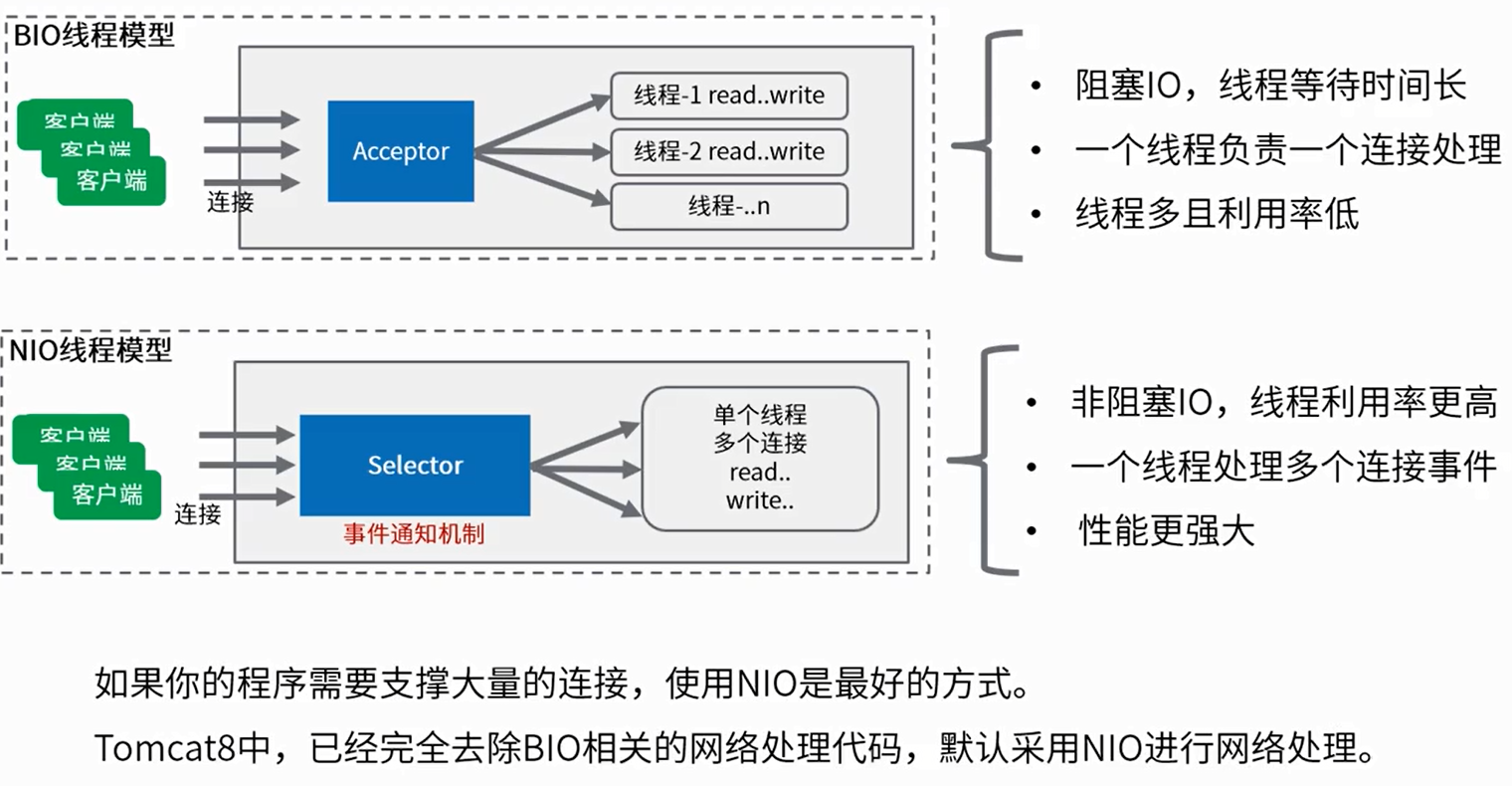
编辑 (opens new window)
上次更新: 2024/05/24, 11:36:46